A password manager is the master key to your digital life. The big providers put it in their cloud, sync through their servers and want an account. Alien Pass does the opposite: a local, encrypted vault for your passwords — fully offline, no account, no server, no telemetry. The app does not even have an internet permission. What is inside never leaves your device in plaintext.
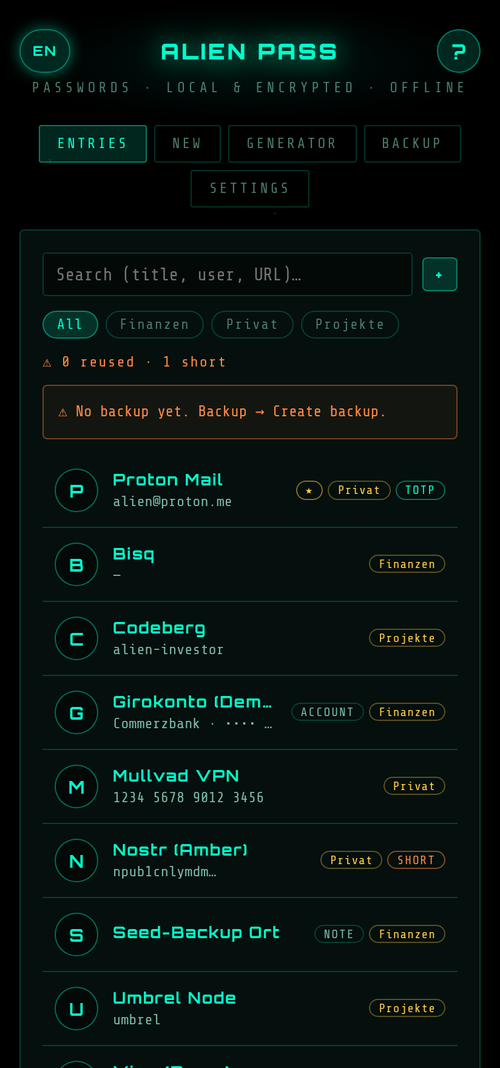
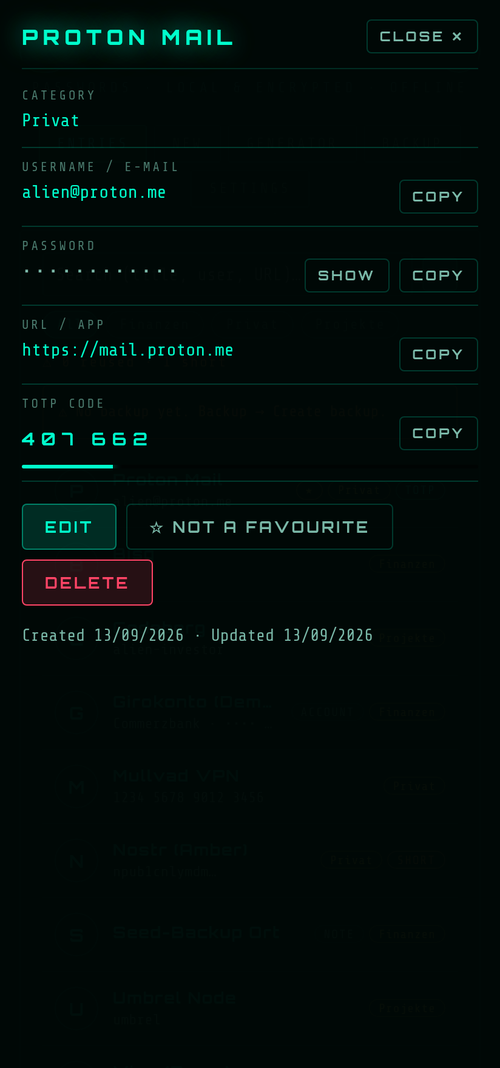
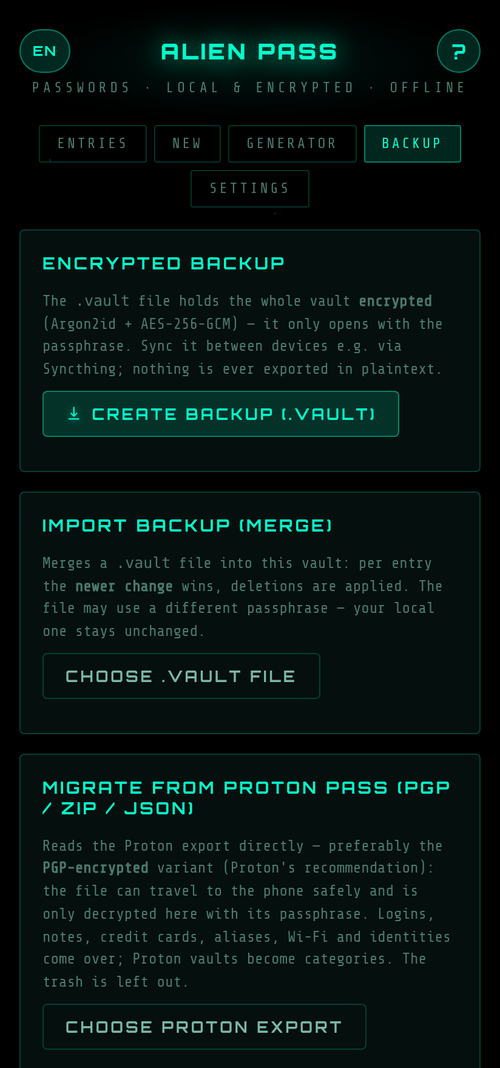
Screenshots with demo data (v1.4).
What it does
- Four entry types — logins (title, username, since v1.4 an optional second e-mail address, password, URL, notes, optional TOTP), encrypted notes, cards (holder, number, expiry, CVV, PIN — masked, copyable) and, since v1.3, accounts (holder, IBAN, BIC, bank, PIN — the list shows the IBAN masked, the PIN only on request). Favourites, search across everything.
- Categories — like folders: type one freely, filter chips above the list. On Proton import the vaults become categories.
- Extra fields, always secret (since v1.4) — up to eight freely named fields per entry, for every type: app PIN, phone password, security question, withdrawal PIN. The value shows only on request and has its own copy button; the label is searchable, the value never. Nothing has to sit in the notes in plain text. Hidden fields from Proton Pass land right here on import.
- Password generator — character passwords (8–64) or dice words from the EFF list (six words ≈ 77 bits). Entropy is shown, honestly corrected in character mode for the rule “every chosen set appears”. Since v1.4 also right inside the entry form: “Generate” opens a panel with mode, length and character sets, every change generates anew.
- TOTP per entry — 2FA codes right at the login entry (RFC 6238, SHA-1/256/512). For critical accounts the app still recommends Aegis.
- Password health — flags reused and short passwords. Deliberately not age: a strong random password does not weaken with time, forced rotation is an anti-pattern (NIST SP 800-63B) — change it when it may have leaked. Purely local, no breach lookup.
- Clipboard auto-clear — 15, 30 or 60 seconds, also in the background as long as Android has not frozen the app; copied content is flagged sensitive so the system preview hides it (Android 13+).
- Auto-lock — after inactivity and in the background (immediately up to 5 minutes).
- Encrypted backup & sync — the
.vaultfile is fully encrypted. Two devices are synced via export and import, e.g. through Syncthing: per entry the newer change wins, deletions are carried over. - Trash (since v1.5) — deleted entries stay restorable for 30 days, up to 200 at a time — once it is full, the next deletion destroys the oldest one straight away. The trash shows only title, type and date of deletion — no reveal, no copy. “Delete permanently” destroys an entry right away. It is device-local: when merging, the deletion travels to your other devices, the content does not — you can only restore on the device where you deleted. Honestly: as long as an entry sits in the trash, it is also in every backup made on that device.
- Migration from Proton Pass — straight from the export, preferably the PGP-encrypted one: the file travels to the phone encrypted and is only decrypted inside the app. Logins with TOTP, notes, credit cards, aliases, Wi-Fi and identities come along. Plus CSV import from KeePassXC and Bitwarden.
- Aegis hurdle — an optional TOTP code on unlock. Honestly named a hurdle against someone who peeked at your passphrase, not a second factor: the key lives inside the vault itself.
- Fingerprint unlock (since v1.2, optional) — the data key is additionally wrapped under a random key that the Android keystore releases only after a strong biometric; none of it enters backups. The passphrase stays the real protection: it is required after every restart, after a passphrase change and when a new fingerprint is enrolled — and "Lock now" is the deliberate bolt for a border or handing the phone over: afterwards only the passphrase opens the vault. Honestly: Android binds the key to every strong biometric of the device; where a strong face unlock is enrolled, it counts too (with a confirmation tap).
- Bilingual — German and English, manual inside the app.
Why offline?
Cloud sync is convenient — and turns the provider into a target. Alien Pass makes not a single network request: no sync servers, no trackers, no external scripts, no check against breach databases. Whatever you want to sync between devices you carry over yourself as an encrypted file. Less convenient than an account — but nobody but you holds the key.
Security — and verifiable
- Argon2id derives the key from your passphrase (default 64 MiB, selectable 32/64/128) — memory-hard, so expensive for GPU attacks on a stolen file.
- AES-256-GCM via native WebCrypto. A random data key encrypts the vault; the passphrase only wraps that key. The file header is authenticated too — tampering is detected.
- Import limits. A foreign backup file cannot force arbitrary Argon2 parameters; all content passes a field whitelist — including your own vault on unlock.
- No reset, no backdoor. Forget the passphrase and the data is gone — but nobody else can get in either.
- Open source. The full client code is public; the bundled third-party code (Argon2 library, EFF word list) is hash-checked in the build. The OpenPGP reader for Proton exports is our own, deliberately small code, including its own AES block cipher, which the test suite checks against FIPS-197 vectors and WebCrypto. The native Android code (FLAG_SECURE, backup rules, clipboard and fingerprint plugin) is in the repo in plaintext as well.
- Four security audits before v1.0, v1.1, v1.2 and v1.5 plus a targeted review of the changes before v1.4, every audit finding fixed and covered by tests. The fixed items are documented in the repo's changelog.
How to get it
As an app (Android / GrapheneOS): deliberately not on the Google Play Store, but via signed releases. Easiest through Obtainium: add the repo URL as a source and it will notify you of every update automatically. Or install the latest APK directly. Or straight from the Zap Store, the app store on Nostr.
Signature fingerprint (SHA-256) to verify authenticity with AppVerifier, identical across all versions:
73:C7:17:D8:05:6C:6A:02:B0:8B:AB:BA:24:18:17:F3:93:E4:6D:EA:03:19:D4:FA:26:B8:C3:D8:E1:F9:3C:95
apksigner: 73c717d8056c6a02b08babba241817f393e46dea0319d4fa26b8c3d8e1f93c95
Hardened at the operating-system level
- No internet permission. The network right is stripped from the Android manifest entirely; "no telemetry" is verifiable, not just promised. The only permissions are the two normal ones for the fingerprint sensor (USE_BIOMETRIC, USE_FINGERPRINT up to Android 8.1) — plus an AndroidX-generated signature permission that grants nothing. The build aborts as soon as any other one appears.
- FLAG_SECURE. No screenshots, no screen recording, no password preview in the app switcher.
- No cloud, ADB or device-to-device backup. The vault lands in no automatic backup (backup rules exclude D2D transfer too) — you make backups yourself via the encrypted
.vaultfile. - Limits, stated honestly: no autofill — deliberately, because an autofill service would have to read the vault outside the app and keep the key in the background. Native code is limited to four small pieces, readable in the repo: FLAG_SECURE, backup exclusion, the clipboard and the fingerprint plugin.
Open source on Codeberg
The client code is open source (MIT license) and free. Build and signing internals stay private; the verifiable part — the app itself — is open. No accounts, no server dependency.
Alien Pass is free. If it helps you, the mothership appreciates some fuel — see below. Sister app: the Sachwert-Tresor for Bitcoin, gold and silver holdings — same architecture, same hardening.